
How to — Video Colorization with RE Colorizer
Workflow, settings table by film type, quick reference.
📋 Contents
Film colorization can be a lengthy process. To avoid hours of unproductive rendering, RE Colorizer offers a structured workflow that lets you adjust the essential parameters and preview the result before the final render.
RE Colorizer defines 3 steps for colorizing a film:
2) Colorization — performed by the DeOldify AI model
3) Post-Processing — enhancing the colorized frames
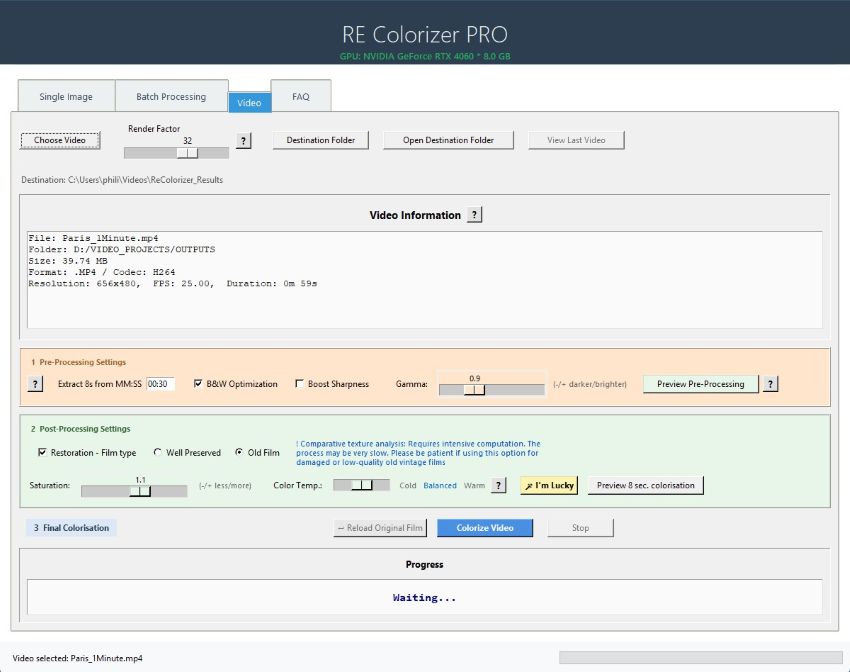
🎬 Workflow
Select the source video
Click Open Video. Accepted formats: MP4, AVI, MOV, MKV.
- If the file is not in MP4/H264, RE Colorizer converts it automatically using the most suitable codec.
- The converted file is placed in the same directory as the original.
Set the Render Factor
Start with the default value (32).
- Heavily damaged film → lower the Render (no point looking for details that aren't there)
- Render too high → the AI model may detect patterns that don't exist
Configure Pre-Processing
3 settings available to optimize the source before colorization:
- B&W Optimization — improves grey shading
- Boost Sharpness — enhances detail
- Gamma < 1.0 — deepens blacks, increases contrast
- Gamma > 1.0 — lifts shadows and reveals hidden detail
Configure Post-Processing
Parameters applied after colorization:
- Well Preserved — smooth result, no plastic effect, for well-preserved films
- Old Film — deep texture analysis, optimal for damaged films (slow process)
- Saturation < 1.0 — natural vintage look, corrects overly vivid skin tones
- Saturation > 1.0 — vivid modern look, revives faded dyes
- Color Temperature — Cold / Balanced / Warm
- 🪄 I'm Lucky — selective highlight correction (yellow haze from old film stock)
📁 Final colorization and output file
Once your settings are validated, reload your source file and click Colorize Video. Processing time depends on your machine's configuration.
The colorized file is saved in the destination folder as:
If a file with the same name already exists, a numeric suffix is automatically added to prevent overwriting.
↑ Back to top📊 Settings table by film type
Recommended settings based on the characteristics of your source film. Use this as a starting point, then refine with the Preview buttons.
| Film type | Restoration | Temperature | Gamma | Saturation | I'm Lucky | Notes |
|---|---|---|---|---|---|---|
| ── Exterior / Natural light ── | ||||||
| Summer / Full sun (1930–1970) | Well Preserved | Cold | 0.9 | 1.0 | On | Strong natural light = warm bias. Cold + Lucky neutralizes. |
| Overcast / Winter (all eras) | Well Preserved | Balanced | 1.0 | 0.9 | Off | Diffuse, flat light. Lucky may cool the greys. |
| Landscape / Nature (1940–1980) | Well Preserved | Balanced | 1.0–1.1 | 1.1 | On | Lucky brightens sky highlights. |
| ── Interior / Studio ── | ||||||
| Interior / Tungsten (1930–1960) | Well Preserved | Warm | 1.0–1.1 | 0.9 | Off | Warm preserves tungsten atmosphere. Lucky would fight the intentional warmth. |
| Studio / Portraits (all eras) | Well Preserved | Balanced | 1.0 | 0.9–1.0 | Off | Skin tones are critical. Stay Balanced — Cold or Lucky risk a blue cast on faces. |
| ── Damaged / Old films ── | ||||||
| Old damaged film | Old Film | Cold | 0.9 | 1.0 | On | Lucky helps lift the yellow haze from nitrate film stock. |
| Faded sepia (1900–1930) | Old Film | Cold | 1.0–1.1 | 0.9 | On | Strong orange/brown cast. Cold + Lucky counteract the sepia bias without overcorrecting. |
| Low contrast / Flat (1950–1970) | Old Film | Balanced | 0.8–0.9 | 1.1 | On | Low gamma deepens blacks. High saturation compensates for faded dyes. |
| ── Special cases ── | ||||||
| Night / Low light (all eras) | Well Preserved | Warm | 1.1–1.2 | 0.9 | Off | High gamma opens shadow detail. Lucky targets highlights — rare in night scenes. |
| High resolution / Very bright (all eras) | Well Preserved | Cold | 0.7–0.8 | 0.9 | On | Maximum highlights — where Lucky is most effective. |
| Balanced modern film (1980–2000) | Well Preserved | Balanced | 1.0 | 1.0 | Off | Better dye stability. Default settings often sufficient. |
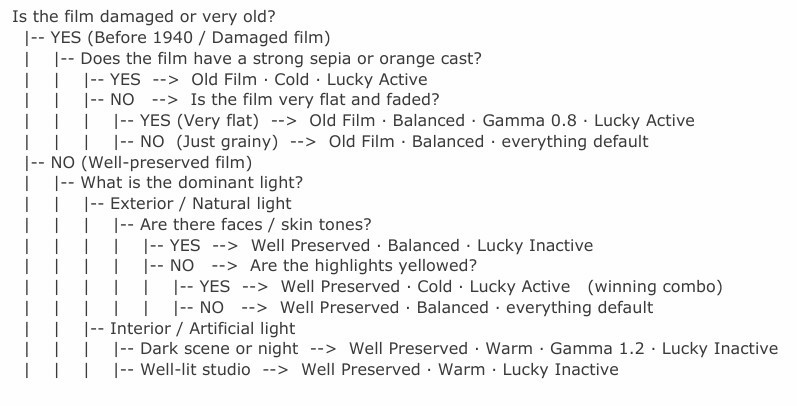
🌿 Decision tree
 ↑ Back to top
⚡ Quick reference
Summary of Post-Processing options at a glance.
🎛️ The Render Factor
The Render Factor controls the AI working resolution. The higher the value, the more the model analyzes fine detail — but beyond a certain threshold, artifacts appear on edges.
| Value | Recommended use | Note |
|---|---|---|
| 25–29 | Heavily degraded video | No point looking for detail that isn't there. |
| 32 | Standard video ⭐ Default | Optimal speed / quality balance. Recommended starting point. |
| 35–40 | Portrait / Landscape | Better rendering of faces and spatial detail. |
| 45 | Maximum | Beyond this: risk of edge artifacts. Use sparingly. |
Ready to colorize your films?
Download RE Colorizer and try the complete workflow on your first videos.
Download RE Colorizer