DeOldify for Windows
The Easiest Way to Colorize
Photos and Videos
DeOldify is one of the most famous AI models for restoring and colorizing old photos and videos. But installing it on Windows normally requires Python, Jupyter Notebook, CUDA configuration and manual dependencies. RE Colorizer solves this by packaging the full DeOldify engine into a simple Windows installer — no command line, no setup, no technical knowledge required.
Download for free⚠️ DeOldify in its original form: powerful but complex
- Python, Jupyter Notebook, multiple manual dependencies to install
- No graphical interface - everything runs from the command line
- Manual CUDA configuration for GPU acceleration
- More technical to use
What is DeOldify?
DeOldify is an open-source deep learning project created to bring old black-and-white photos and videos back to life with realistic colors. It uses generative adversarial networks (GANs) to infer plausible colors based on textures, context, and learned patterns from millions of images. DeOldify quickly became popular among enthusiasts and professionals, but its original form is mostly a research tool: it runs in notebooks, requires a GPU setup, and is not designed as a plug-and-play Windows app.
RE Colorizer takes the DeOldify model and integrates it into a streamlined Windows interface, so you can benefit from its quality without dealing with Python, environments, or scripts.
RE Colorizer: DeOldify packaged for Windows
RE Colorizer ships the DeOldify engine inside a standard Windows installer. Everything is included: PyTorch, CUDA, AI models. You double-click, you colorize.
A single .exe installer. Python, PyTorch, CUDA and the DeOldify models are all included. No dependencies to install manually.
Load your photo or video, adjust settings with sliders, preview the result. Everything visual, nothing command-line.
Your photos stay on your computer. No image is ever sent to a server. Colorization runs entirely on your machine.
Full integrated video pipeline: frame extraction, colorization, MP4 reconstruction. Supported formats: MP4, AVI, MOV, MKV.
RE Colorizer automatically detects your NVIDIA card and enables CUDA. No manual configuration. Falls back to CPU if no GPU is available.
Render Factor, Pre-Processing, Post-Processing, Color Temperature, Saturation — the full potential of DeOldify exposed through intuitive sliders.
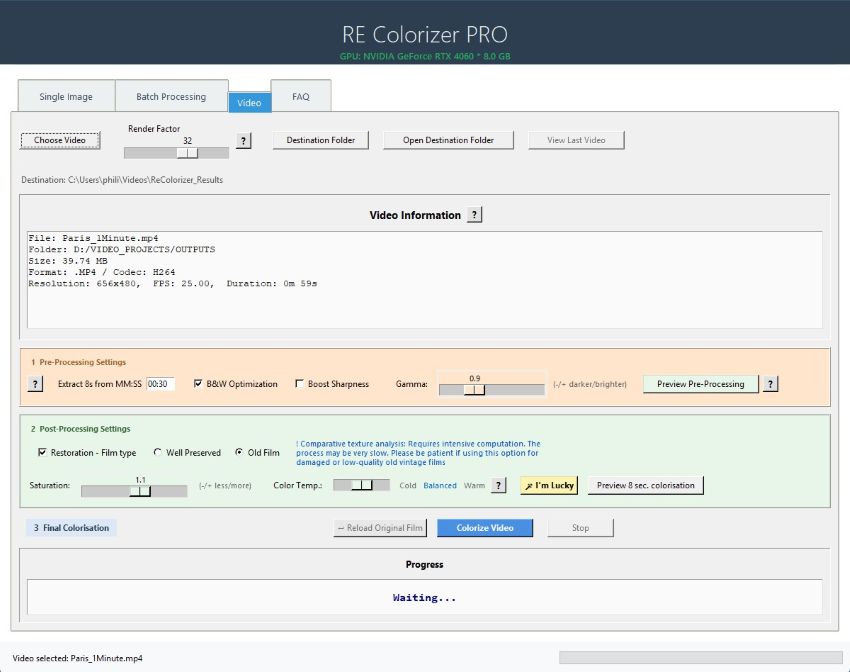
RE Colorizer PRO interface — all DeOldify parameters accessible on one screen
Results: Before / After
DeOldify technology at work — photos colorized 100% locally on Windows.
 Before
  After
After  Before
  After
After
DeOldify original vs RE Colorizer
Same AI engine, radically different experience.
| Feature | DeOldify (original) | RE Colorizer |
|---|---|---|
| Installation | Python + Jupyter + manual dependencies | ✅ Single .exe installer |
| User interface | Command line / Jupyter Notebook | ✅ Full Windows graphical interface |
| Photo colorization | ✅ Yes | ✅ Yes + preview |
| Video colorization | Partial, manual | ✅ Full automatic pipeline |
| GPU acceleration (CUDA) | Manual configuration | ✅ Automatic detection and activation |
| Pre / Post-Processing | Not available | ✅ Gamma, Saturation, Temperature, Old Film… |
| Batch processing | No | ✅ PRO version |
| Usable without technical knowledge | No | ✅ Yes, from the very first launch |
💡 In short: RE Colorizer uses exactly the same DeOldify engine that developers use in Python - but packaged for easy use on Windows.
System Requirements
Windows 10 / 11 (64-bit)
NVIDIA with minimum 6 GB VRAM (CUDA). Also works on CPU, but slower.
Around 5–8 GB for the full installation including DeOldify models.
Only for license activation (PRO version). Colorization is 100% offline.
DeOldify on Windows – FAQ
Is DeOldify still maintained?
The original DeOldify project is stable but not actively evolving at the same pace as newer AI models. However, its quality is still excellent for many photos, and RE Colorizer integrates a curated version of the model optimized for Windows workflows.
How can I use DeOldify on Windows without Python?
Instead of installing Python, CUDA and Jupyter Notebook, you can use RE Colorizer, which embeds the DeOldify engine inside a native Windows application. You simply install the program, open your images or videos, choose your settings, and start colorizing with a few clicks.
Is there a DeOldify GUI for Windows?
Yes. RE Colorizer provides a full graphical interface around the DeOldify model on Windows. You can preview results, adjust settings, process multiple files, and save your outputs without any command-line usage.
What is the best DeOldify alternative for Windows?
For users who want DeOldify-level quality without technical setup, RE Colorizer is a strong alternative. It combines DeOldify-style colorization with an easy installer, GPU support, and dedicated tools for both photos and videos.
Does DeOldify work offline with RE Colorizer?
Yes. Once installed, RE Colorizer runs entirely on your Windows machine. Your images and videos stay local, and colorization works offline without sending files to external servers.
Can DeOldify colorize videos?
The original DeOldify can be used for video through scripts, but it is complex to set up. RE Colorizer integrates video colorization into a guided workflow, so you can process clips and longer footage directly from the interface.
Try DeOldify on Windows now
Download RE Colorizer Light for free and colorize your first photos in under 5 minutes.
Download RE Colorizer